

Claude and ChatGPT now let people use outside products without leaving the chat, through connectors and plugins that independent builders can submit to their directories.
Getting listed is where it gets uneven. One Claude connector went live 10 minutes after submission; another company that applied in March was still waiting in October. This guide covers what happens from submission to a live listing and after, on both platforms. It draws on the official Claude and OpenAI docs (checked November 23, 2026), 7 Reddit threads where builders described their submissions between July and November 2026, and our own plugin submissions to the Claude and OpenAI directories.
Section 1: Pick your route first#
Each route has its own review, rules and contact
There are four ways to publish, and a rule on one route often doesn't apply on another. This article calls them Claude connector, Claude plugin, your own marketplace and ChatGPT plugin.
All four build on the Model Context Protocol (MCP), an open standard for connecting AI apps to outside tools and data. The MCP server is the part you run. On Claude, a connector is an MCP server listed in the directory, and a plugin is a package that can hold skills, hooks and MCP servers. On ChatGPT, a plugin is the package, holding an MCP server, skills or both. An MCP App is an MCP server that also shows an interactive interface inside the chat; on Claude it's submitted as a connector.
| Route | What you submit | Review | Who makes it live |
|---|---|---|---|
| Claude connector | A remote MCP server, through the Claude directory | An automated scan; listed as Community by default, and Anthropic may escalate it to Verified | You press Publish after approval |
| Claude plugin | A plugin from a GitHub repo, through the Claude directory | Validation and a security scan on every version; a person reviews each new listing | An Anthropic reviewer, by default |
| Your own marketplace | Any Claude Code plugin in a repo you host | None by Anthropic | Users add your marketplace and install |
| ChatGPT plugin | A ZIP with an MCP server, skills or both | Automated checks and a scan of your server, then review; one active review per plugin | You select Publish plugin after approval |
The ChatGPT directory is shared with Codex.
On Claude, a plugin's server is a separate submission
If a Claude plugin uses a remote MCP server you run, that server goes through review again as a connector. Claude's docs say to submit it as a connector "even when a plugin you're submitting already references it". One builder said in October that their plugin icon didn't show correctly until both were submitted.
On ChatGPT, the MCP server is part of the plugin and is reviewed with it.
Some Claude Code plugins can't go to ChatGPT as they are
ChatGPT's public directory doesn't accept plugins with hooks, and local MCP servers are limited to approved partners. Hooks are scripts a plugin runs on events such as a session starting. A ChatGPT plugin also connects at most one MCP server, and a server can't yet be added to a plugin first published as skills only.
Section 2: Before you submit#
Claude needs Pro or higher to submit; ChatGPT works on a free account
Any paid Claude plan can submit; a Team plan isn't required. Pro, Max and Ultra users submit from their own account at claude.ai/directory/manage. On Team and Enterprise, an Owner submits, or on Enterprise someone the Owner gave the Directory permission. Free accounts can't submit.
On ChatGPT, you can submit from a free account; a paid subscription isn't required. Publishing needs individual or business verification, and the submitter must be the organization owner or a member with Apps Management Write permission. We submitted our own plugin from a free ChatGPT account (OpenAI submission).
Tool descriptions describe; they don't instruct or sell
Both platforms want a description to say what a tool does, what it takes and what it returns. Claude's review criteria reject descriptions that don't match the tool, tell the model to call tools the user didn't ask for, hide instructions, or promote products. OpenAI's guidelines ask for what a tool does and its side effects, and ban promotional words such as "best" or "official" in tool names.
LetsFG, a flight and hotel booking connector, rewrote all 26 tool descriptions during Claude review in October. One had grown past 5,000 characters of "always do this, never do that." They moved that guidance into the tool results, where the model reads it when it needs it. Reviewers also flagged results that called a fare "a good deal", because the model repeats results to the user.
On Claude, one tool can't both read and change data
Claude rejects a single tool that both reads and writes. That includes catch-all tools such as api_request with a method parameter. Explaining the safe and unsafe parts in one description doesn't satisfy Claude's review criteria.
Tool labels decide whether users are asked before each call
On Claude, a tool labeled read-only can run without asking the user; one labeled destructive always asks. These labels are called annotations. Claude's review criteria require every tool to have a title and either readOnlyHint: true or destructiveHint: true. The trip-logistics author reported in July that after approval, connecting from the directory set every tool to "always allow", while the same server added as a custom connector asked first.
On ChatGPT, OpenAI's guidelines require every tool to set readOnlyHint, destructiveHint and openWorldHint explicitly. OpenAI's pages disagree on one point: the submission errors page asks for a justification for each value, while the guidelines say "annotation justifications are no longer required".
Reviewers flagged leaky errors, oversized results and real customer data
What passed review: errors that say what went wrong without internals, compact results, and test accounts holding fake data. Claude's review criteria fail generic errors such as "Internal Server Error" and ask for responses "reasonably sized for the task". Scout Monitoring reported in October that errors were sending their full stack trace to the client, and one tool returned 373,000 characters. They switched to a short summary with more detail on request.
Claude's connector portal doesn't take credentials; for Verified review, a reviewer asks for test access by email. Scout gave reviewers a demo organization with fake data. LetsFG has no passwords, told reviewers to connect as a guest, and that was accepted.
On ChatGPT, the reviewer login has to work without MFA, email or SMS codes, or magic links.
Claude keeps payments out of the chat; ChatGPT allows only physical goods
Neither platform lets a plugin or connector take payment freely inside the chat. Under Claude's review criteria, connectors can't transfer money, cryptocurrency or other financial assets. LetsFG reported that any step adding or raising a charge, from a small price rise to a paid bag, needed approval through an emailed link. The link opens a page with a button, because email scanners open every link.
On ChatGPT, OpenAI's guidelines allow commerce only for physical goods, with external checkout. A plugin can't show subscription plans, start a subscription or promote upgrades, but can link to an informational page about plans.
Claude's listing shows only the tools your connection could see
The Claude connector portal lists the tools exposed to the account you connect with when you submit. One builder reported in October that their listing missed a whole family of tools for that reason. Requiring sign-in before listing tools is allowed: the MCP spec's own example is an authenticated tools/list call, the request that lists a server's tools.
On ChatGPT, submission needs a current, successful scan of your production server; without one it fails with scan_required.
Requirements that stop or hold a submission
These are the items that block or delay a submission on each route. Each route's full checklist is linked in Sources at the end.
| Claude connector | Claude plugin | ChatGPT plugin | |
|---|---|---|---|
| Endpoint and sign-in | HTTPS; OAuth 2.0, or no sign-in for public data | Not applicable | HTTPS; a domain-verification token; no API-key or bearer-token sign-in |
| Listing | Name up to 100 characters, one-liner 200, description 2,000; the slug can't change once published. For an MCP App, 3 to 5 PNG carousel screenshots, at least 1000px wide, each with its prompt text (connector submission) | README of at least 40 words; a license | Display name of 30 characters or fewer |
| Testing | Confirm every tool ran in MCP Inspector or as a custom connector | claude plugin validate, then the portal's Validate step | For remote MCP plugins: exactly 5 positive and 3 negative test cases, a demo recording and release notes. Skills-only plugins don't need MCP test cases or a demo recording |
| Account and limits | Seven policy acknowledgments | GitHub push access; repo public before it goes live; 10 submissions per org per 24 hours, drafts and withdrawn ones included | No EU data-residency project if there's an MCP server |
| Held or refused | Failing tools; generic errors; tool names over 64 characters | Pinned packages, lockfile installs and unreadable scripts are held for a reviewer; over 50 MiB or 10,000 files stops validation; a missing description, author or version is only a warning | A missing or stale server scan; non-empty server headers |
Section 3: In review#
Claude and ChatGPT publish no fixed review timeline
Neither platform publishes a review time, and the builder reports vary widely. Claude says it "isn't fixed"; OpenAI says timelines vary and asks developers not to request expedited review.
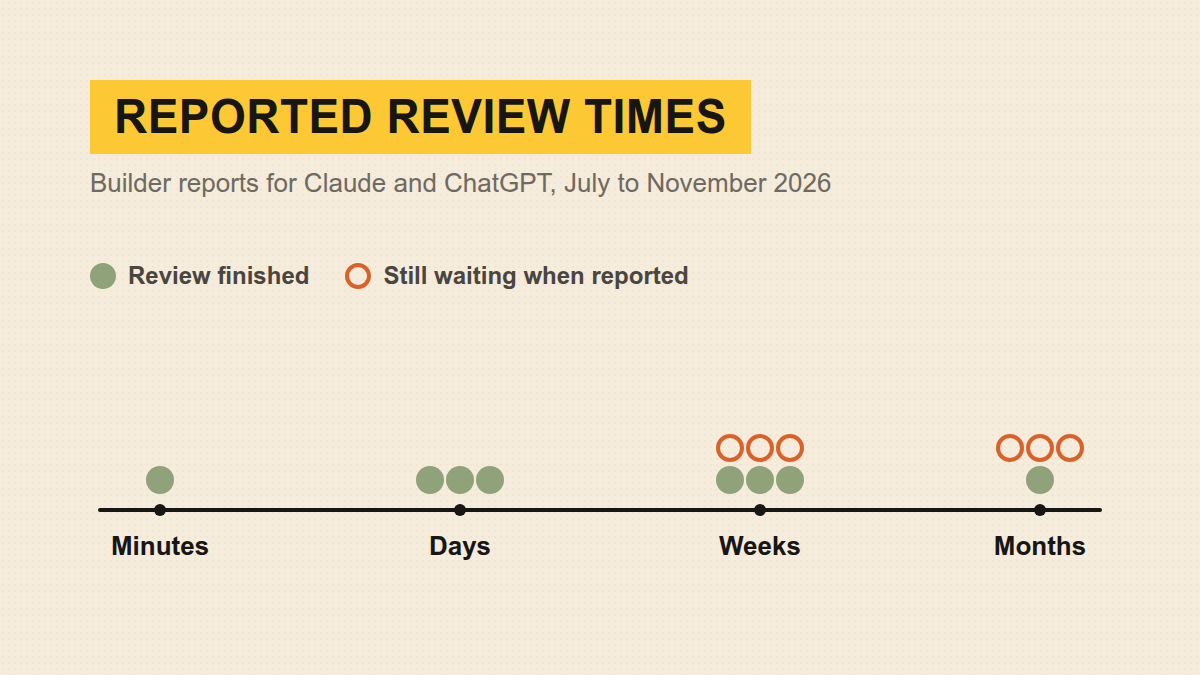
Finished reviews, Claude first:
| Who | Route | Review time | When |
|---|---|---|---|
| Scout Monitoring | Claude connector | About a day; automated scan; live as Community | October |
| LetsFG | Claude connector | A few days, with three rounds of changes; then about a week more after a listing edit | October |
| One builder | Claude connector | About 10 minutes; live as Community | Early September |
| One builder | Claude connector | 20 days, no messages until approval | September |
| Workopia | Claude connector | A little over 2 months; no changes requested | May to August |
| Trip-logistics connector | Claude connector | 20 days | July |
| DJfindr | ChatGPT plugin | 4 days | November |
| One builder | ChatGPT plugin | 2 weeks; passed the automated checks, then approved | October |
Still waiting when reported, Claude first:
| Who | Route | Waited so far | As of |
|---|---|---|---|
| DJfindr | Claude connector | 3 weeks | November |
| FullEnrich, contact data | Claude connector | Applied in March; questions on data sources, legal basis and opt-out | October |
| One builder | Claude connector | 3 months | October |
| One builder | Claude plugin | Submitted September 7; not in the public catalogue | October |
| LetsFG | ChatGPT plugin | 3 weeks | October |
| One builder | ChatGPT plugin | Rejected for an outdated privacy policy; resubmitted September 28 | October |
One case is left out on purpose. A builder who submitted to Claude in February waited seven months, until Anthropic asked them to resubmit because old submissions were lost in a directory system change. The resubmission was approved in eight days.
Status changes show in the portal, not always by email
Two builders said neither store emailed them when their status changed; one found the approval only by opening the portal. On Claude, the portal shows Draft, In review, Changes requested, Not approved, Approved or Published.
On ChatGPT, review feedback arrives by email, and support asks for the plugin ID.
Editing during review sends a submission back
On Claude, editing a listing after approval but before publishing returns it to review. On ChatGPT, changing a submission means cancelling the active review. Claude's status docs describe the first; LetsFG said that edit cost them about a week.
On ChatGPT, only one review can be active per plugin, so a change means Cancel Review, then resubmit.
Where to look when a review stalls
The places to check are the portal status, the error code and the review email, and each route has its own contact. Shared first, then Claude, then ChatGPT.
- Weeks with no word. Builders in this situation weren't told a cause. Check the portal status, feedback and your spam folder. Claude's status docs list mcp-review@anthropic.com for connectors and directory@anthropic.com for plugins. For ChatGPT, contact support with the plugin ID.
- The Claude portal can't connect or shows the wrong tools. Check authentication and whether the connected account can access every expected tool, then sync again.
- A Claude plugin version is held. Claude's checklist names pinned packages, lockfile installs and unreadable scripts as reasons. Read the finding in the portal, check the pre-submission checklist, document what the plugin runs, then wait for the reviewer.
- Claude says "escalated review". According to the review message, the category has policy still being finalized, or a specialist team has to see it. The review message says it isn't a rejection. One builder reported waiting more than two months.
- Claude feedback repeats after a fix. Check whether the feedback refers to the latest deployed version. If it doesn't, email the contact with the listing name, organization and status.
- A ChatGPT submission fails after the ZIP uploads. A final requirement is missing. The error code names it, such as
scan_requiredordomain_verification_required; OpenAI lists them on its submission errors page. Upload checks are only the first stage. - ChatGPT rejected it in one line. In one report, the privacy policy described an older version of the server. Fix it, then resubmit.
Workopia replied once to Anthropic's acknowledgment email after about two months, got an answer within a day, and was published shortly after. They didn't claim the email sped it up.
Section 4: After approval#
Approved doesn't mean live
On both platforms, an approved submission reaches users only after it's published. Claude's status docs say a connector marked Approved "isn't in the directory yet" until you publish it; the trip-logistics author pressed Publish and was live a minute later. A Claude plugin is published by an Anthropic reviewer by default.
On ChatGPT, you open the approved version and select Publish plugin. SlickTrip reported in November that their ChatGPT app couldn't be found in ChatGPT's search until it was approved.
On Claude, colleagues on a company plan may not see your listing
Team and Enterprise members see only the connectors their admin allows. On Team, a member who can't enable a connector can click Request to ask the owners. The trip-logistics author couldn't find even Booking.com from a Team account while testing; personal accounts saw the full directory.
A live listing brought users to some builders and not others
One Verified Claude connector reported around 24,000 signups in five weeks. SlickTrip, a travel price tracker, reported up to 1,500 signups a day for about two weeks, then about 250 a day, with no ads. Claude recommends it alongside Expedia and Booking.com. Another builder in the same discussion reported that inbound demos from Claude doubled and then fell. These reports describe individual launches.
The trip-logistics connector had 99 tool calls from real users by September, and the users the author could see arrived with their own posts. Workopia, a job board, said in August that about 80% of its users still come through the web.
On Claude, every directory connector is eligible for in-chat Suggested Connectors, and directory ranking is based on usage. Connectors start as Community; Anthropic may escalate one to Verified, there's no application, and "you don't need to take any action," according to the verification docs. The same page says Verified "isn't a security audit".
On ChatGPT, featured placement can't be requested.
In one connector's logs, about 9 in 10 tool calls weren't real users
In one server's logs, bots, crawlers and health checks far outnumbered real users. The trip-logistics author counted 1,007 non-human tool calls against 99 from real users. About 900 came from anonymous scripts making test calls; the rest were the author's own tests. After the server was added to the official MCP Registry, a public list of MCP servers, about 2,000 crawler requests a day arrived. Anthropic's own daily check only connected and listed tools.
Claude's publisher dashboard shows directory rank, users who called a tool, tool calls and error rate; the numbers are in beta and lag up to 24 hours. The trip-logistics author added that rank counts accounts that tried to connect over 30 days, and that cells stay blank below 5 calls. Claude plugins have a Usage tab with installs, active accounts, retention and a listing funnel. Your own marketplace sends nothing back. The measurement docs say "Claude Code doesn't report a plugin's usage back to its author."
Existing users don't get your tool changes automatically
People already connected can keep old tools, versions or permissions after you change something.
- Claude connector: you change tools on your server without resubmitting; tool names shown on the listing need a listing edit a reviewer approves. A new endpoint means users remove and re-add the connector.
- Claude plugin: every new commit is scanned, and the last published version stays live while a new one is held. If
plugin.jsonsetsversion, it goes up each release. - Your own marketplace: auto-update is off by default for third-party marketplaces.
- ChatGPT plugin: the server is scanned daily or when you press Rescan. New tools stay hidden and changed tools keep their old definition until they pass; deleted tools disappear on the next scan. To change an existing MCP server's URL, contact support; the current update flow doesn't support URL changes directly.
Two builders added detail for Claude. The trip-logistics author found that a tool added later didn't reach an already connected user until they refreshed the connector, while description edits went live at once. LetsFG reported that renaming a tool or changing its description reset every user's "Always allow" for that tool.
A retired tool can keep getting called
One builder found that a removed tool stayed in connected users' lists, and that the client retried calls that failed. A builder replying to the trip-logistics author suggested answering with a normal, successful response that says the tool is retired and names what to call instead. The trip-logistics author confirmed the client silently retried a failed call during a deploy.
A deploy can leave connected users hanging
After one builder's redeploy, a tool call from an already connected user hung for four minutes. The server answered curl in under a second the whole time; turning the connector off and on fixed it. The trip-logistics author avoided this with a stateless server and by letting in-flight calls finish before shutdown. The 2025-11-25 MCP spec answers an unknown session with HTTP 404 so the client starts a new one; the 2026-07-28 spec removes those sessions.
On Claude, strict per-IP limits can throttle real users
All claude.ai traffic comes from a small shared pool of Anthropic IP addresses, one builder reported. A tight per-IP limit therefore hits real users. The same builder said the review never asked about abuse or quotas.
Section 5: Getting your product into Claude and ChatGPT#
Building the server is the part most of us enjoy. After that comes review, feedback, and a wait you can't schedule. We went through it with our own plugins, and this article is mostly what we wish we'd known before sending them in.
If your server works, checking it against each directory's requirements is what gets people using your product inside Claude or ChatGPT. We've brought those requirements together here, alongside the things other builders ran into. You'll still have to wait, but you'll have a better idea of what to prepare and where to look if something stalls.
Good luck with yours. If you ever want to talk it through, send us a message.